
LESCO Duplicate Bill – Check & Download Online (2026)
Check your LESCO duplicate bill online using your 14 digit reference number or 7 digit Customer ID. You can view the latest Lahore Electric Supply Company bill, check the payable amount, due date, billing month, meter reading, and download or print a duplicate bill copy for payment or record keeping.
Check LESCO Duplicate Bill Online
Enter your 14-digit LESCO reference number to open the official electricity bill on PITC in a new tab.
LESCO does not support CNIC, name, or address-based bill lookup.
This page helps LESCO consumers in Lahore, Sheikhupura, Kasur, Okara, and Nankana Sahib access their electricity bill through official billing data without confusion.
Check Your LESCO Duplicate Bill Online
Use the LESCO bill checker above to enter your reference number or Customer ID. After submitting the correct details, your latest available LESCO electricity bill should open with the current amount, due date, and billing details.
You can use this page to:
- Access bill details on mobile or desktop
- Check LESCO bill online
- View latest bill amount
- Download duplicate LESCO bill
- Print electricity bill copy
- Check bill due date
- Verify billing month and meter reading
Official Source and Privacy Note
Duplicate Bills Online does not generate LESCO bills, collect payments, store reference numbers, save Customer IDs, or access private billing records.
Your final bill details come from the official electricity billing system. Always verify the consumer name, billing month, due date, payable amount, and payment status on the official bill page before making payment.
Last checked: June 2026
Data source: Official LESCO/PITC billing access
Privacy: We do not store your bill number or payment details
What You Need to Check LESCO Duplicate Bill
To check your LESCO duplicate bill online, you need one of the billing identifiers printed on your electricity bill.
| Detail | Use |
|---|---|
| Reference Number (14 digitis) | Most common method for checking LESCO duplicate bill |
| Customer ID (7 digits) | Alternative option where supported by the official bill page |
| Internet Connection | Required to open the online bill |
| Mobile or Desktop Browser | Works on phone, tablet, laptop, or desktop |
For best results, enter the number exactly as printed on your bill. Do not add spaces, dashes, or extra characters unless the official bill form asks for them.
LESCO Reference Number vs Customer ID
LESCO bills can usually be checked through the reference number printed on the electricity bill. The official bill form may also show a Customer ID option, which can be used when it is available and printed on your bill.
| Option | What It Means | When to Use |
| Reference Number | The main bill lookup number printed on your LESCO bill | Use this first if you have an old bill |
| Customer ID | An alternative customer billing identifier | Use it if the official bill page provides this option |
| CNIC | National identity card number | Not a standard public method for LESCO duplicate bill lookup |
| Name or Address | Consumer name or property address | Not reliable for public online bill checking |
If one option does not work, recheck your bill copy and try the other official option if available.
Where to Find Your LESCO Reference Number?
The LESCO reference number is printed on your electricity bill. It usually appears in the upper section of the bill near the consumer and billing details.
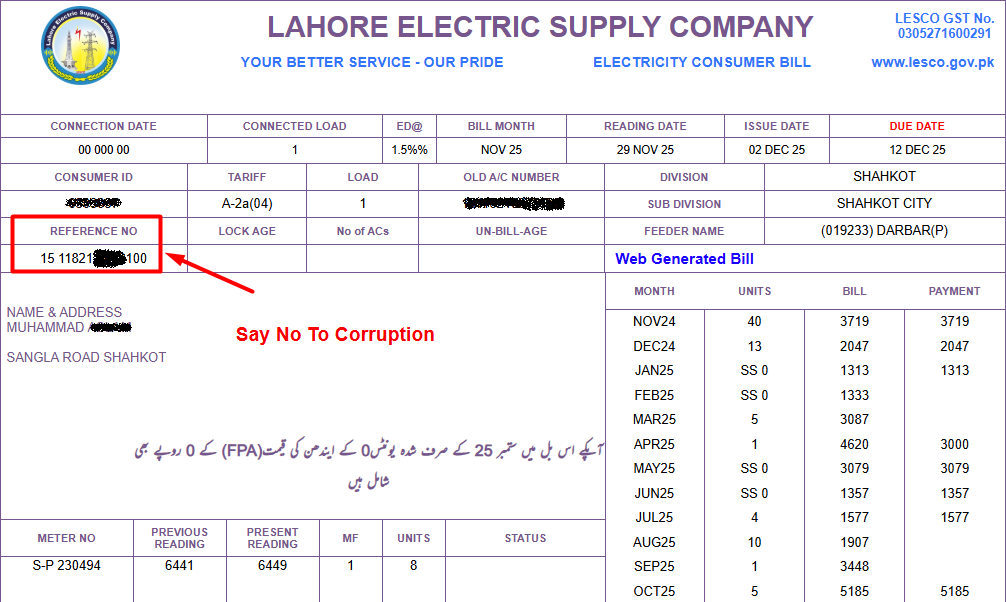
You can find your reference number on:
- Previous printed LESCO bill
- Downloaded PDF bill copy
- Old payment receipt
- Screenshot of an earlier bill
- Bank or payment app bill record, where available
Without the correct billing number, the online bill page may show an invalid number error or fail to open your latest bill.
Where to Find LESCO Customer ID?
The Customer ID is another billing identifier that may appear on your LESCO bill. If the official bill page gives a Customer ID option, you can use the number printed on your bill to check the duplicate bill.
Check the upper area of your bill near the consumer details, reference number, or billing information. If you are unsure which number is the Customer ID, compare your current bill layout with the official bill form before submitting.
How to Check LESCO Bill Online?
Follow these steps to check your LESCO bill online:
- Find your reference number or Customer ID from an old LESCO bill.
- Enter the number in the LESCO bill checker.
- Submit the form to open the latest available bill.
- Review the consumer name, billing month, due date, and payable amount.
- Download the duplicate bill as PDF or print it for payment and records.
If the page does not open, recheck the number and try again after a few minutes. Official billing servers can sometimes load slowly during high-traffic periods.
How to Download or Print LESCO Duplicate Bill?
Once your LESCO bill appears on screen, you can download or print the duplicate copy directly from your browser.
Use this process:

Steps to Download or Print
- Open the bill after entering your reference number or Customer ID.
- Confirm the bill belongs to your electricity connection.
- Press the print button or use your browser’s print option.
- Select “Save as PDF” to download the bill.
- Print the PDF if you need a hard copy for payment or records.
The duplicate copy usually shows the same main details as the printed bill, including payable amount, due date, billing month, meter reading, taxes, and after-due-date amount.
What Details Appear on a LESCO Duplicate Bill?
A LESCO duplicate bill usually includes the important details needed for verification, payment, and record keeping.
| Bill Detail | Why It Matters |
| Consumer Name | Confirms the bill belongs to the correct connection |
| Reference Number | Used for bill lookup and payment |
| Customer ID | Alternative billing identifier where available |
| Billing Month | Shows the month covered by the bill |
| Issue Date | Shows when the bill was generated |
| Due Date | Last date to pay before late charges |
| Meter Reading | Helps compare current and previous usage |
| Units Consumed | Shows electricity usage for the billing period |
| Payable Amount | Amount payable before due date |
| Amount After Due Date | Amount payable if paid late |
| Taxes and Adjustments | Shows additional charges included in the bill |
Always match these details before paying your LESCO bill.
LESCO Service Areas
LESCO stands for Lahore Electric Supply Company. It supplies electricity to Lahore and nearby districts in Punjab.

LESCO: Lahore’s Electricity Distributor and Pakistan’s Largest Urban DISCO
Lahore Electric Supply Company (LESCO) is the electricity distribution company for Lahore city and seven surrounding districts of Punjab. By consumer count, LESCO serves over 5.7 million consumers, making it one of the two or three largest DISCOs in Pakistan by any measure. Its head office is at WAPDA House, The Mall, Lahore. The helpline is 118 and the official website is lesco.gov.pk.
LESCO Service Territory: Lahore and 7 Surrounding Districts
LESCO’s network covers a dense urban and peri-urban area, entirely within central Punjab. Its 8-district coverage includes some of Pakistan’s most commercially and industrially significant areas:
| District | Key Areas |
|---|---|
| Lahore | All of Lahore city, Cantt, DHA, Model Town, Johar Town, Gulberg |
| Sheikhupura | Sheikhupura, Muridke, Sharaqpur, Ferozewala |
| Nankana Sahib | Nankana Sahib, Shahkot, Sangla Hill |
| Kasur | Kasur, Chunian, Pattoki, Kot Radha Kishan |
| Okara | Okara, Depalpur, Renala Khurd |
| Sahiwal | Sahiwal, Chichawatni, Pakpattan |
| Pakpattan | Pakpattan, Arifwala |
| Nankana (rural feeders) | Industrial feeders to Quaid-e-Azam Industrial Estate |
LESCO in Pakistan’s First DISCO Privatization Tranche
LESCO is among the three DISCOs selected for Pakistan’s first privatization tranche, alongside FESCO and IESCO. The federal government’s privatization programme, overseen by the Privatization Commission, aims to transfer management and equity of these three DISCOs to private sector operators. LESCO’s selection is due to its relatively lower transmission and distribution losses and its dense, high-recovery urban consumer base in Lahore – making it among the most commercially attractive DISCOs.
How to Check Your LESCO Duplicate Bill
LESCO uses two identifiers: a 14-digit reference number and a 7-digit Customer ID. The reference number is faster for bill lookup and appears at the top-right of your printed bill. The Customer ID is on the front of the bill, usually below your name.
- 14-digit reference number: fastest lookup, appears top-right of printed bill
- 7-digit Customer ID: alternative identifier, shown below your name on the bill
- Bills are available on the PITC portal at bill.pitc.com.pk
- LESCO also offers its own portal at lesco.gov.pk for account management
LESCO Electricity Tariff (Domestic Consumers)
| Monthly Units | Tariff Per Unit |
|---|---|
| 1 to 100 units | Rs. 12.21 per kWh |
| 101 to 200 units | Rs. 14.53 per kWh |
| 201 to 300 units | Rs. 31.51 per kWh |
| 301 to 400 units | Rs. 38.41 per kWh |
| 401 to 500 units | Rs. 41.62 per kWh |
| 501 to 600 units | Rs. 43.04 per kWh |
| 601 to 700 units | Rs. 44.18 per kWh |
| Above 700 units | Rs. 49.10 per kWh |
Lahore consumers are subject to Punjab Electricity Duty in addition to GST (17%) and quarterly fuel price adjustments.
LESCO Industrial and Commercial Load
Lahore is Pakistan’s second-largest industrial city after Karachi. LESCO supplies electricity to the Quaid-e-Azam Industrial Estate, Kot Lakhpat Industrial Area, Sundar Industrial Estate, and hundreds of private industrial units. Industrial consumers (B1, B2, B3 categories) are billed on time-of-use (TOU) metering. Lahore’s textile, leather, and pharmaceutical industries account for a significant share of LESCO’s peak demand.
LESCO Contact and Complaint Channels
| Channel | Details |
|---|---|
| Helpline | 118 (24/7 fault reporting) |
| Head Office | WAPDA House, The Mall, Lahore |
| Website | lesco.gov.pk |
| PITC Portal | bill.pitc.com.pk |
| NEPRA Complaint | 080-04400 (for unresolved disputes) |